


If you’re running a wood waste grinder business or just dealing with frustratingly slow throughput on your machine, you know how big of a drag it is—deadlines get pushed back, costs pile up, and that whole “sustainable wood waste disposal” goal feels impossible to hit. I’ve been selling wood waste grinders for over 8 years, and I’ve walked customers through so many slow throughput headaches that I could probably troubleshoot this in my sleep. Today, I’m sharing the practical, real-world fixes I’ve seen work (plus a few I’ve learned the hard way never to try).
First, let’s get one thing straight: “low throughput” isn’t just “the grinder is running slow.” It’s when you’re feeding in a consistent stream of wood waste, but you’re getting way less finished product per hour than your machine’s specs promised. The specs? They’re based on ideal conditions, not the random mix of old pallets, fence posts, and scrap lumber most of us have to work with. That’s why troubleshooting is less about checking a manual and more about looking at the small, easy-to-miss stuff that adds up.
Let’s start with the part most people skip before even turning on the machine: what you’re feeding it. I can’t tell you how many times I’ve gotten a panic call at 2 PM from a customer saying “my grinder’s dead slow—what do I do?” and when I ask what they’re shoving into the hopper, they say “just whatever wood waste I have lying around.” News flash: not all wood is created equal. For example, if you’re feeding wet, rotted wood, that’s a huge throughput killer. Wet wood is denser, it clumps together, and it’s way harder for the blades to tear through. I once had a customer feeding wood that’d been out in the rain for 2 weeks, and his throughput was 30% lower than normal—just by letting that wood dry for 24 hours, he got back almost all of it. Also, that random mix you’re feeding? Like, mixing a 4x4 fence post with a pile of sawdust scraps? That’s a no-go. The large, dense pieces get stuck, so the machine has to work way harder to chew through them, slowing the whole process down. If you’re working with a lot of pallets, by the way, our Wood Pallet Shredder is built specifically to handle that—its adjustable feed rollers prevent jams and keep the feed consistent, which instantly boosts throughput for pallet waste. I always tell customers: sort your feed first. Remove any metal nails (I’ve seen a nail bend a blade so bad throughput dropped 50% overnight), break down really large pieces into smaller chunks if you can, and let wet wood dry a little before feeding it. That one step fixes so many slowdowns.
Next up: the blades. This is probably the most common issue, and it’s also the most misunderstood. A lot of people wait until their blades are totally dull before replacing them, but by then, throughput is already suffering. Dull blades don’t cut wood—they tear it, which takes way more energy and time, and they leave uneven pieces that can slow the feed. How do you know if your blades are bad? If the finished product is really ragged, or if you hear the machine straining every few seconds when you feed it. I recommend checking blade sharpness every 50 hours of use, and balancing them every 200 hours—unbalanced blades cause vibration, which not only slows throughput but also wears out other parts of the machine faster. Oh, and don’t forget the blade clearance! That’s the tiny gap between the rotating blades and the stationary anvil (the fixed metal part inside the grinder). If that gap is too big, the blades can’t grab the wood properly, so they just push it around instead of cutting it. If it’s too small, they’ll hit the anvil, which is dangerous and can damage the blades. For most wood waste grinders, the ideal clearance is about the thickness of a credit card—easy to check with something you probably have in your wallet. I’ve had customers adjust that gap by even 1/8 of an inch and see throughput jump by 15% immediately. If you’re working with different types of wood, you might need to tweak that clearance a little—harder woods need a smaller gap, softer woods a slightly bigger one.
Now, the feed system. This is another area I see people mess up all the time. The feed conveyor or hopper controls how much wood gets into the grinder at once, and if you’re feeding too much at once, that’s a jam waiting to happen. Jams kill throughput instantly—you have to shut the machine down, pull the stuck wood out, reset it, and that’s 10 minutes or more wasted every time. How do you avoid overfeeding? Start with a slow, steady feed rate. Don’t dump the whole hopper in at once—feed it like you’re pouring cereal into a bowl, not a bucket. Some customers think faster feeding = more product, but actually, it’s the opposite. Overfeeding makes the motor work too hard, causing it to stall or slow down, which crushes throughput. If your grinder has a variable speed feed (most good ones do these days), adjust it based on what you’re feeding: slower for dense, hard wood, a little faster for soft scraps. Also, check the feed rollers—if they’re worn down, they can’t grip the wood properly, so it slips instead of moving into the grinding chamber. I had a customer with a wood grinder that’d work fine for soft wood but slow way down when he fed pallets, until we noticed his feed rollers were smooth from 3 years of use. Replacing them took 30 minutes, and his throughput for pallets went up 25%—no other changes needed. And hey, if you’re working with other materials too, we’ve got machines for that too, like our Plastic Bottle Grinder for plastic waste, Food Waste Grinder Machine for organic scraps, PVC Grinder Machine for pipe and plastic trim, or Tire Grinding Machine for rubber tires—each built to optimize feed for their specific material, so you don’t have to troubleshoot cross-material issues.
Let’s talk about the motor and power supply next. This is the hidden culprit a lot of people ignore. Your grinder’s motor is rated for a certain horsepower, but if you’re plugging it into an undersized generator or an extension cord that’s too long and thin, the motor isn’t getting enough power to run at full speed. I had a customer once with a 75 HP grinder running on a 50-foot extension cord that was 12-gauge—too thin for that distance, so the voltage dropped, making the motor run 10-15% slower, which meant throughput was lower. Swapping to a 10-gauge cord fixed it, no other changes. Also, if your motor is old, check the brushes—worn brushes can cause the motor to lose power over time, which slows the whole grinder down. Another thing: make sure the motor’s pulley and the grinder’s pulley are sized correctly. If you swapped out a part and left the pulley too small, the grinder spins slower than it should. This is a easy check—compare the pulley size to the original specs in your manual, and if it’s off, swapping it back fixes the speed. Also, clean the motor vents regularly—if they’re clogged with wood dust, the motor overheats, which triggers a thermal switch to slow it down to prevent damage. I can’t tell you how many customers call me saying “my grinder keeps shutting down mid-job” and it’s just dust clogging the vents. Wipe them out once a week, and you’ll avoid that issue.
Now, the grinding chamber itself. Over time, wood dust and small debris build up in the chamber, right? That’s called “saturation,” and it means there’s less space for the wood you’re feeding, so throughput drops. I recommend taking the chamber apart and cleaning it out every 100 hours of use—don’t just blow it out with compressed air, get in there and wipe the walls and screens. Speaking of screens: the screen is the part that controls the size of the finished product, right? If you’ve got a screen that’s too small, the grinder has to grind the same piece over and over until it’s small enough, which kills throughput. If it’s too big, the product size is off, but throughput is higher—so it’s a balance between what you need for your end product and how fast you want it. If your throughput is low and your screen is old, check for holes or cracks—even a small crack can let pieces get stuck, slowing things down. Another thing about the chamber: make sure there’s no debris stuck between the blades and the chamber walls. Sometimes small wood chips get packed in there, creating a barrier that the blades can’t cut through, so they push wood around instead of grinding it. I once helped a customer who’d had low throughput for months, and when we took the chamber apart, there was a solid 2-inch layer of packed wood dust and chips between the blades and the walls. Clearing that out got his throughput back to spec immediately.
Wait, what about environmental factors? I live in the Pacific Northwest, where it’s rainy a lot, so I see this all the time. Cold weather can also affect throughput—if it’s below freezing, wood gets harder, and the grease in the machine parts thickens, making everything work slower. If you’re working in cold or wet conditions, make sure you’re using a high-quality, water-resistant grease on all moving parts, and let the machine warm up for 5 minutes before cranking it to full speed. I always tell customers in colder climates to keep their grinder in a heated space when it’s not in use, even if it’s just a small shed, to keep parts from getting too cold. And if you’re in a super dusty area, check the air filters for the motor and hydraulic system (if your grinder has hydraulics) weekly—clogged filters make the machine work harder, slowing throughput.
Let’s wrap this up with a quick troubleshooting checklist you can use the next time your throughput is low. First, stop feeding the machine and let it cool. Check: 1) The feed material: is it sorted, dry, and free of metal/nails? 2) The blades: are they sharp, balanced, and set to the right clearance? 3) The feed system: are rollers worn, are you feeding too fast, and is the conveyor working properly? 4) Power supply: is the cord/generator big enough, is the motor running at full speed, and are vents clear? 5) Grinding chamber: is it clean, is the screen intact and the right size? 6) Parts: are pulleys and belts in good shape, no cracks or wear?

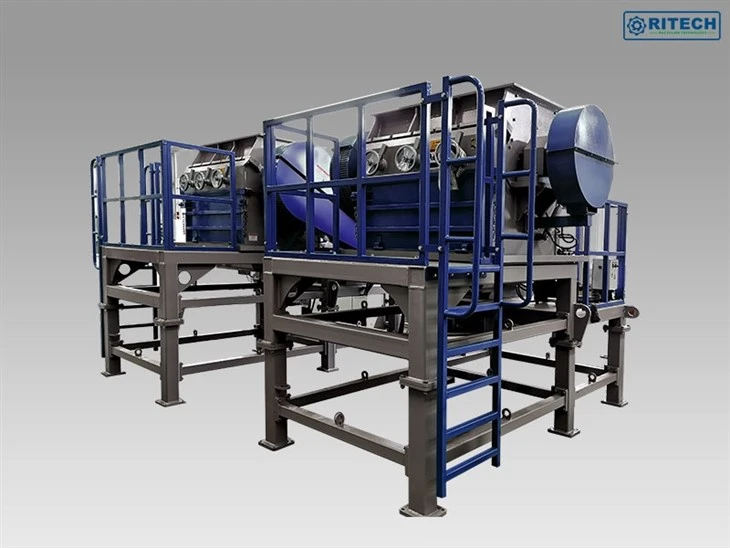
At the end of the day, most low throughput issues are easy fixes—no need to replace the whole machine. If you’re still dealing with slow throughput after going through this checklist, or if you’re looking for a grinder that’s built to handle your specific wood waste (or other materials, like the ones we talked about: Wood Pallet Shredder, Plastic Bottle Grinder, Food Waste Grinder Machine, PVC Grinder Machine, Tire Grinding Machine), our team can help you pick the right machine and walk you through any setup or troubleshooting tips. Just reach out, and we’ll get you sorted so you can get back to grinding at full speed.
References
- Wood Processing Machinery Maintenance Guide, Industrial Machinery Association, 2022.
- Optimal Throughput Parameters for Wood Grinders, Journal of Sustainable Waste Management, Vol. 14, No. 3, 2021.
- Machine Performance in Wet and Cold Operational Conditions, Equipment Operators Association, 2020.
- Blade Maintenance Best Practices for Granulator Equipment, Industrial Maintenance Journal, Vol. 18, No. 2, 2023.


